Writing books with LaTeX, using VIM

Admittedly, this is rather fringe to most readers of this blog, and I expect no comments on this post 🙂

But I thought it important to post this for those Googling certain terms and searching for help in writing books using LaTeX and VIM.

I use VIM as my editor for almost everything I write – including entering text in web pages, where I use the Firefox blugin “It’s All Text“. Since some time back, I have been more active as a writer, and my rediscovery and progressively love for LaTeX as the document publishing system has taken hold. Being a tools geek, I decided to do some tweaking of the standard LaTeX syntax plugin for VIM.

The plugin resides in the system-wide VIM syntax folder and is named “tex.vim”. To make use of my improved LaTeX plugin, simply copy my plugin to your own “.vim/syntax” directory, and you will get better tab settings and the possibility to fold parts/chapters/sections etc. of the book using the standard markers – like this:

\chapter{Name of the Chapter} %{{{1

With this, the chapter will be foldable all the way to the next marker on the same level (the above example showing level “1” of folding). Remember to put the percentage symbol before the fold marker to ensure LaTeX treats that part as a comment and does not render it as document text.


Transcend Exchange

exchange

Noun:

  1. An act of giving one thing and receiving another (esp. of the same type or value) in return.

transcend

Verb:

  1. Be or go beyond the range or limits of (something abstract, typically a conceptual field or division).
  2. Surpass (a person or an achievement).

L. Ron Hubbard stresses the concept of exchange in many of his policy letters. In the policy letter from 1982 titled, “Exchange, Org Income and Staff Pay”, he delineates cllearly his take on four levels of exchange:

First consider a group which takes in money but does not deliver anything in exchange. This is called rip-off. It is the “exchange” condition of robbers, tax men, governments and other criminal elements.

Second is the condition of partial exchange. The group takes in orders or money for goods and then delivers part of it or a corrupted version of what was ordered. This is called short-changing or “running into debt” in that more and more is owed, in service or goods, by the group.

The third condition is the exchange known, legally and in business practice, as “fair exchange.” One takes in orders and money and delivers exactly what has been ordered. Most successful businesses and activities work on the basis of “fair exchange.”

The fourth condition of exchange is not common but could be called exchange in abundance. Here one does not give two for one or free service but gives something more valuable than money was received for. Example: The group has diamonds for sale; an average diamond is ordered; the group delivers a blue-white diamond above average. Also it delivers it promptly and with courtesy.

While this sounds well and good, it has dawned on me lately that there is something missing. Perhaps the most important level is missing – a level dear to my heart. I would see it as a level above all these four:

The transcending of exchange. It’s the level of not caring about echange, of “giving without thought of reward”, of “practical karma theory”, of give-give-give. This flies in the face of standard operating Scientology where you are taught “to get your exchange in” and to ensure “others get their exchange in”, where flows need to be balanced, where one only gives with thought of, or even demand for, reward.

Fuck that. Just give. I belive that is the core of life.

O – M – G

Unpacked my new telescope last night. Up and running in matter of minutes. Holy cow! What a scope!!

It talks. It shows videos. It moves gracefully to the objects of my desire.

Despite the all too bright Norwegian summer sky, it showed the Ring Nebula (M57) nicely. Despite clouds scattered across the sky, that hour last night will go down in history.

If anything could match sex, this certainly would be a worthy candidate.

Ahhhhhhhhhhhhhhhh. Bliss!!!

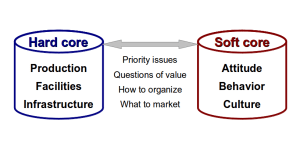
Hard Core to Soft Core

Just got around to write down more of our ideas (Brendan and myself) in a document titled “Hard Core to Soft Core”.

Here’s the abstract:

How do the soft assets of an organization relate to the hard assets? How does an organization change its culture? How does the structure of an organization relate to its people, products and processes?

These are but a few of the questions this article examines. It highlights the relationships between the various elements of an organization — from the hard core physical assets to the soft, intangible human elements.

Here’s the document: http://www.scribd.com/doc/94065549/Hard-Core-to-Soft-Core