Writing books with LaTeX, using VIM

Admittedly, this is rather fringe to most readers of this blog, and I expect no comments on this post 🙂

But I thought it important to post this for those Googling certain terms and searching for help in writing books using LaTeX and VIM.

I use VIM as my editor for almost everything I write – including entering text in web pages, where I use the Firefox blugin “It’s All Text“. Since some time back, I have been more active as a writer, and my rediscovery and progressively love for LaTeX as the document publishing system has taken hold. Being a tools geek, I decided to do some tweaking of the standard LaTeX syntax plugin for VIM.

The plugin resides in the system-wide VIM syntax folder and is named “tex.vim”. To make use of my improved LaTeX plugin, simply copy my plugin to your own “.vim/syntax” directory, and you will get better tab settings and the possibility to fold parts/chapters/sections etc. of the book using the standard markers – like this:

\chapter{Name of the Chapter} %{{{1

With this, the chapter will be foldable all the way to the next marker on the same level (the above example showing level “1” of folding). Remember to put the percentage symbol before the fold marker to ensure LaTeX treats that part as a comment and does not render it as document text.

ITIL – pragmatic and simple

As you may (or may not) know, I have been working professionally for many years with the IT organizational framework called ITIL (IT Infrastructure Library).

As mentioned before, my main focuses when helping my clients is:

  1. 100% responsibility
  2. Simplicity
  3. Immediate relevance

As ITIL can be seen as almost the opposite of the above, Brendan Martin and myself have been working hard to reduce ITIL to something simple, that is immediately relevant for an IT department or vendor, and that embodies the concept of 100% responsibility. Through numerous successful projects, we have now summarized our approach in a simple and straightforward document.

From the abstract:

“The IT Infrastructure Library (ITIL) is a best practice framework for service management . ITIL is a trademark owned by the Cabinet Office (part of HM Government). The framework was originally intended to serve the delivery of Information Technology within a company, but can also be used outside of IT and for delivery of services between companies. It could be argued that ITIL focuses on the implementation of processes to facilitate service management.

This article provides a pragmatic view of ITIL – a simpler and more straightforward implementation of some of the core ITIL processes.”

Get the article at Scribd.com or get the PDF directly from isene.com.

I have sent out the following message to several ITIL-related LinkedIn groups totaling more than 80000 members:

“Those who have been wrestling with the ITIL books may appreciate the simplicity presented in this article: http://www.scribd.com/doc/91495325/ITIL

I expect objections ranging from “It isn’t this simple” and “Organizations are too complex for this approach” to “You don’t implement ITIL, you implement Service Management” and possibly “You can’t give this away for free“. The ITIL professional communities tend to be rather elitist, self-protective of their revenue stream, closed-data-minded and complex.

But since I believe in simplicity and that information should be free, I decide to share this freely.

A decent e-mail setup

After my company decided to move its mail services to GMail, I was faced with a more complex e-mail setup. I now have four different email accounts that I need to log into and read mail from. There are several e-mail aliases on two of the accounts. So, with two different GMail accounts (one with my first name dot my last name at GMail.com and the other with my full e-mail address from my company as login [yes, the full login address is geir.isene@freecode.no@imap.gmail.com]).

I decided to plunge into it and create a full e-mail architecture that would serve me the best. This is a technical article aimed at helping those with similar challenges that I encountered in the last few days. With this I hope others will not have to spend hours upon hours wading through troubleshootings in the quest for a decent e-mail setup.

Design goals: To have all e-mail on my laptop and handle it locally for speed and convenience while at the same time keep a copy of important mail on the servers as backup and for handling when I am not at my laptop. Additionally I want the fetched e-mail stored in various folders in my local e-mail system. I want all this easily configurable so that, for example, certain mail is fetched and marked as read, but not deleted and stored in a specific folder in local mail.

With e-mail handled locally, I get faster response in e-mail handling, faster search, faster scripting, and more time for my children.

Here’s my basic setup:

First I go all the e-mail from my company mail server (which I used IMAP to read and which is now moved to GMail) with OfflineIMAP. This resulted in a some hundred thousand e-mail transfered to my local folder (~/Maildir) with all my folder structure preserved.

Here’s the first challenge; Since my company uses Courier as the IMAP server, all IMAP folders are stored in a flat directory structure with a “dot” as a directory delimiter. This means that the folder “INBOX/Geir/Personal/” is stored not as a real tree structure in the file system, but rather as the directory named “INBOX.Geir.Personal/”. With more than hundred directories, this becomes a very un-navigatable list if it wasn’t for Courier’s ability to show this as a usual hierarchy.

First I tried to point Mutt directly to my Maildir directory to handle e-mails directly from that folder. But then I was faced with the list of flat directories that makes it unmanageable. It also makes it impossible for Mutt to “subscribe” to folders as in a normal IMAP server setup.

So I decided to install an IMAP server to handle the directory structure so that the hierarchy would show up in Mutt. This would also add the benefits of easy folder creation and easier scripting with Ruby’s Net/IMAP class.

I first tried the Dovecot IMAP server, but couldntt get it to show my folders in a hierarchy structure, so I went on to install the Courier IMAP server on my laptop.

But alas, Courier would not show my directories at all. Lots of debugging and I figured out that the root directory (~/Maildir) was itself treated as the “INBOX” and all subdirectories must start with a period. Therefore I had to rename all the folders produced by OfflineIMAP – for example, “INBOX.Geir.Personal/” had to be renamed to “.Geir.Personal/” and voilá – all folders magically appeared! (Use “rename ‘s/INBOX//’ *”).

Then it was the matter of getting mail fetched from four different accounts at three different servers. I tired Fetchmail and Getmail and looked at Retchmail. But none of these provided an easy path to my design goals.

So I decided to go ahead and make my own solution. With my old imap_tools as the foundation, I created a script that not only satisfied my design goals but also provides great flexibility and an easy way to enhance it in the future (being a Ruby script makes it easy for me). The resulting script is fairly easy to use even if you don’t know Ruby. Just substitute what you need in the script and save it in your “bin” folder (set permissions with “chmod 755 mail_fetch.rb”).

Due to WordPress’ limitation in uploading files, I give you the whole script here (disregard the screwy tabs and the proportional font – again WP-limitations to html):

——————————

#!/usr/bin/ruby 
# Copyright 2012, Geir Isene. Released under the GPL v. 3
# Version 0.2 (2012-04-24)


##################
#   Initialize   #
##################

require "ftools"
require 'net/imap'

# In .mail.conf, set the appropriate variables like this:
#
#  I_server1  = ""
#  I_user1    = ""
#  I_pass1    = ""
#
# Iserver0 would be "localhost" for mail delivery to local IMAP server
# Use as many servers you need with I_serverX, I_userX and I_passX
load    '~/.mail.conf'

$count = 0


###########################################
#   Define main Fetch & Filter function   #
###########################################

def matching (match, match_in, to_box, del)
    res = []
    message = ""
    to_box = "INBOX." + to_box
    if match_in =~ /s/ then res = res + $imap_from.search(["UNSEEN", "SUBJECT", match]) end
    if match_in =~ /b/ then res = res + $imap_from.search(["UNSEEN", "BODY", match]) end
    if match_in =~ /f/ then res = res + $imap_from.search(["UNSEEN", "FROM", match]) end
    if match_in =~ /t/ then res = res + $imap_from.search(["UNSEEN", "TO", match]) end
    if match_in =~ /c/ then res = res + $imap_from.search(["UNSEEN", "CC", match]) end
    if match_in =~ /h/ then res = res + $imap_from.search(["UNSEEN", "HEADER", match]) end
    if match_in =~ /a/ then res = res + $imap_from.search(["UNSEEN", "TEXT", match]) end
    res.uniq!
    res.each do |message_id|
      message = $imap_from.fetch(message_id,'RFC822')[0].attr['RFC822']
      $imap_to.append(to_box, message)
      if del == 1
	  $imap_from.store(message_id, "+FLAGS", [:Deleted])
      else 
	  $imap_from.store(message_id, "+FLAGS", [:Seen])
      end
      $count = $count + 1
    end
end


#######################################
#   Log into the target IMAP server   #
#######################################

$imap_to = Net::IMAP.new(I_server0, port="143")
$imap_to.login(I_user0, I_pass0)
$imap_to.select("INBOX")

###############################################################
#   Log into each "from"-server. Start Fetching & Filtering   #
###############################################################
#
# The syntax for matching is: 
# matching("string-to match", "match-against", "send-to-mailbox", "delete mail?)
# Set "delete mail?" to 1 if you want mail deleted from the source server.
#
# The following options are available to match against:
# "s" for SUBJECT, "b" for BODY, "t" for TO, "f" for FROM, "c" for CC
# to match any part of the mail (header or body): "a" for ALL

# From I_server1 (private GMail)
$imap_from = Net::IMAP.new(I_server1, port="993", usessl="true")
$imap_from.login(I_user1, I_pass1)
$imap_from.select("INBOX")

matching( "",				"s",	"Geir",		    0 )	# Catch rest

# Expunge mails that are set to be deleted and then disconnect
$imap_from.expunge
$imap_from.disconnect

# From I_server2 (FreeCode GMail)
$imap_from = Net::IMAP.new(I_server2, port="993", usessl="true")
$imap_from.login(I_user2, I_pass2)
$imap_from.select("INBOX")

matching( "efn-listen",			"tc",   "Lists.EFN",	    1 )
matching( "efn-agenda",			"tc",   "Lists.EFN-agenda", 1 )
matching( "styre@mailman.efn.no",	"tc",   "Lists.EFN-styret", 1 )

matching( "",				"s",    "FreeCode",	    0 )	# Catch rest

# Expunge mails that are set to be deleted and then disconnect
$imap_from.expunge
$imap_from.disconnect

# From I_server3 (FreeCode OLD)
$imap_from = Net::IMAP.new(I_server3, port="993", usessl="true")
$imap_from.login(I_user3, I_pass3)
$imap_from.select("INBOX")

matching( "ivy-subscribers",		"tc",	"Lists.IVY",	    1 )
matching( "FreezoneOrg@yahoogroups.com","tc",	"Lists.FZa",	    1 )
matching( "ifachat@yahoogroups.com",	"tc",	"Lists.FZa",	    1 )
matching( "koha",			"tc",   "Lists.Koha",	    1 )
matching( "nuug.no",			"tc",   "Lists.NUUG",	    1 )
matching( "linuxiskolen@skolelinux.no",	"tc",   "Lists.SLX",	    1 )
matching( "spirituellkultur",		"tc",	"Lists.AltMus",	    1 )
matching( "hhc@lists.brouhaha.com",	"tc",	"Lists.HHC",	    1 )

matching( "",				"s",	"Geir",		    0 )	# Catch rest

# Expunge mails that are set to be deleted and then disconnect
$imap_from.expunge
$imap_from.disconnect

# From I_server4 (FreeCode Int)
$imap_from = Net::IMAP.new(I_server4, port="993", usessl="true")
$imap_from.login(I_user4, I_pass4)
$imap_from.select("INBOX")

matching( "",				"s",	"FreeCode",	    0 )	# Catch rest

# Expunge mails that are set to be deleted and then disconnect
$imap_from.expunge
$imap_from.disconnect

##############################################################
#   Check for new mails in folders and write result to file  #
##############################################################

mailboxes = [
    [ "FC  : ",	"FreeCode"	    ],
    [ "Geir: ",	"Geir"		    ]
]

open('/home/noosisegei/.mail', 'w') do |f|
    mailboxes.each do |a|
	f.write( a[0] + $imap_to.status("INBOX." + a[1], "UNSEEN")["UNSEEN"].to_s + "\n" )
    end
end

# Copy file to another file to ensure no blinking in Conky
# Read the file from Conky to display new email in each folder
File.copy('/home/noosisegei/.mail','/home/noosisegei/.mail2')

#######################################################################
#   Disconnect from target server & Display number of mails filtered  #
#######################################################################

$imap_to.disconnect

puts "#{$count} mails filtered"


——————————

To make the script run every minute, add it as a cron job. Use “crontab -e” to add:


* * * * * /home//bin/mail_fetch.rb >/dev/null 2>&1

Just substitute “” with your own username. It outputs the number of new mails in certain folders by writing it to a file named “~/.mail2 so that you can use this to display new mails in Conky (see my conkyrc for how this is done).

I hope this will shave a few hours off someone’s schedule.

Update: Dovecot is not compatible with the above script as it fails to deliver the $imap.status message (“UNSEEN”) from the mail repository. So, Courier is the IMAP server to use with this script.

HyperList: Everything. Concise and precise.

HyperList is a methodology to describe anything in plain text.

HyperList can be used to describe any state or transition – anything from simple shopping and todo lists to large project plans, process design, the human history, the human DNA or the whole universe.

With HyperList, descriptions become simple, easily readable, concise and precise.

After a couple of months of work, and with a total overhaul, WOIM has been transformed into HyperList! I would like to extend my thanks to Marilyn Abrahamian for her invaluable help in proof reading and for suggesting some new, very useful features.

You will find the HyperList document on my newly redrawn home page (isene.com) or by clicking this direct link to the HyperList document. It is also available on Scribd.com.

I admit freely to being proud of this; I consider HyperList to be one of my most useful contributions so far.

For the users of the excellent text editor VIM, there is a plugin that makes it very easy to create and manage HyperLists in VIM. The plugin includes a large range of features such as:

  • Complete highlighting of HyperList elements
  • Collapsing and expanding of up to 15 levels in a list
  • Linking/referencing between elements (items) in a list
  • Easy navigation in lists, including jumping to references
  • “Presentation modes” where you can view only parts of lists and line-by-line
  • Creating and checking of checkboxes in a list, with or without date stamps
  • Encryption (and decryption) of whole lists or parts of lists
  • Auto-encryption of lists – making a list into an excellent password safe
  • HTML and LaTeX export of lists
  • … and many more features.

Enjoy 🙂

My talk on Big Data at the CiO Forum

Thanks to those who contributed ideas to my talk this Thursday. I held the opening talk at the CiO Forum here in Oslo. The forum is hosted by Computerworld and there was between 100 and 200 IT executives attending.

I was about to fall prey to my own preconceived idea that I should have a set of “traditional slides” (albeit with weird twists) as the basis for my talk. I should mention that I very seldom do slides. Mostly it’s me with a flip-over dancing and jumping and gesticulating like an Italian. I tend to use people from the audience up on stage to do small role-playing scenarios, to let the audience do drills and such. But this time I was about to simmer down to conservatism when Brendan thankfully shot my slides to pieces. As he kept on questioning my approach, I realized that I was on the wrong track.

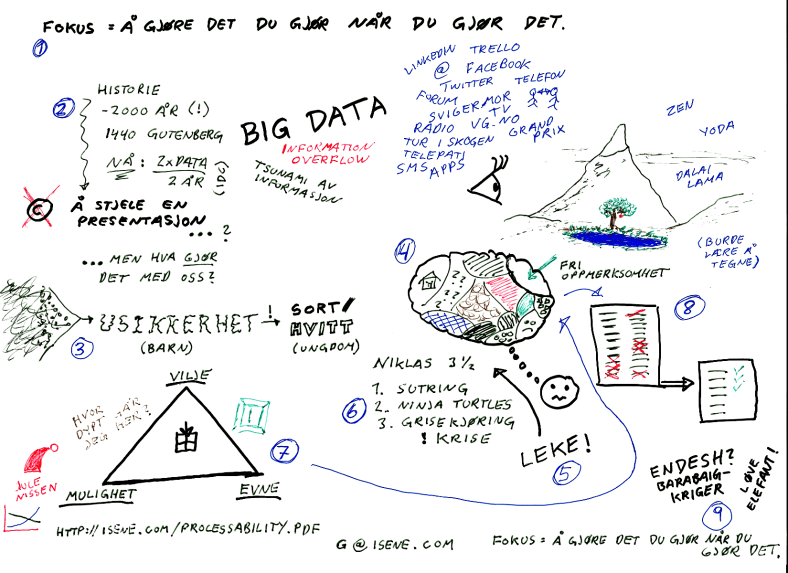
Instead I decided to take a piece of paper and draw out the concepts I wanted to cover, and true to my own website, I ended up scanning the drawing and using that as the main point of my presentation. Funny when another speaker approached me before my talk, looked at this “slide” and asked: “Is that Powerpoint… or another fancy presentation program?” “It’s pen, paper, scanner”, I replied and he looked slightly confused.

I know that most of you here don’t read Norwegian. This is as good a time as any to learn the language. Any questions – just ask 🙂

Here’s the link to the full image.

Processes, automation and human potential (final cut)

After a solid overhaul, and with added concepts and information, the article “Processes, automation and human potential” is now published and available on Scribd.com. It is also available here.

From the abstract:

The following article attempts to illuminate some important aspects of business and organization, such as:

  • What can and should be automated?
  • When should you trust people rather than processes?
  • What is responsibility and how can you ensure the intended production?

This article tackles the basis for automation, processes and human potential for reaching goals.

For the readers interested in Scientology – this article incidentally explains why perhaps the main policy of Scientology, the “Keeping Scientology Working” spells the demise of the subject itself.

Information overflow

What happens to us as we stand in a storm of information?

The information overflow is steadily increasing. We are bombarded by information from countless channels – newspapers, TV, radio, billboards, Facebook, Twitter, e-mail, sms, Linkedin, Google+, Diaspora, Trello, e-mail lists, forums, face to face conversations, phone, phone apps, blogs…

With such a massive amount of data, how do we cope? How do we sort? How do we sift? What to trust, and what to ditch?

On February 16th, I will be holding the opening speech at the CIO forum in Oslo. And with people like you reading my blog, I would be stupid not to ask for your views.

I am not simply looking for how you think we should handle massive data, but also what it does to an individual, to our society.

Gimme your take on the human aspect of the information overflow.

Update: My post after the talk.

multitasking

Processes, automation and human potential

I have been working with an article that captures the essence of my recent professional work, during the last year or so. Brendan and I have been consulting several organizations with the aim of helping them achieve better results – be it more revenue or profit, more efficient use of time, customer satisfaction, better cooperation or above all releasing individual initiative, responsibility and creativity.

I release the article here first to invite feedback from the wonderful and smart contributers on this blog. If you read the article and give some valuable input, you may be credited if you want.

The article is here: “Processes, automation and human potential

Describe anything – plain and simple with WOIM (new version: 1.6)

Another update to your favorite descriptive system.

From the ad: “WOIM is an Outliner, a TODO-list solution, a project management tool, a Business Process Management aid, a data modeler, a Use Case facilitator, a way to describe the human DNA or the history of the universe 😉 It can also encrypt your lists and be used as a very structured  password safe.

WOIM (Warnier/Orr/Isene/Möller) is a plain text way to describe whatever. Used together with the greatest text editor invented (VIM) and the WOIM plugin, you have an elegant solution on your PC.

The new version 1.6 includes the possibility of adding pre-formated or literal blocks of text inside a WOIM list. With this you can add blocks of programming code or other fancy text without having to worry about WOIM markup inside such a block.

As usual, the VIM plugin for WOIM lists follows suit, and is now available in version 1.6 as well. Go frolic.

Nerdvana – second circle

When I first saw the light of Nerdvana and converted from Windows to Linux some 12 years ago, I was eager to explore my newfound freedom. I tried some 30+ Window Managers until I settled on Pekwm. For 7 years I was a loyal Pekwm user, and as some may have noticed I am enthusiastic about the tools I use. I tweaked it to perfection until Pekwm was exactly as I wanted it.

One of the perks of running a company like FreeCode is that I get to work with some amazing tech people. The other day Kim Tore showed me his Window Manager (yeah, it was like “I show you mine if you show me yours”). It was awesome. It was “tiling” – where the WM takes automatic care of window placement. But with a config file in Lua(!), it wasn’t awesome enough. But my interest was sparked, like back in the days of exploration where I was on my big WM hunt.

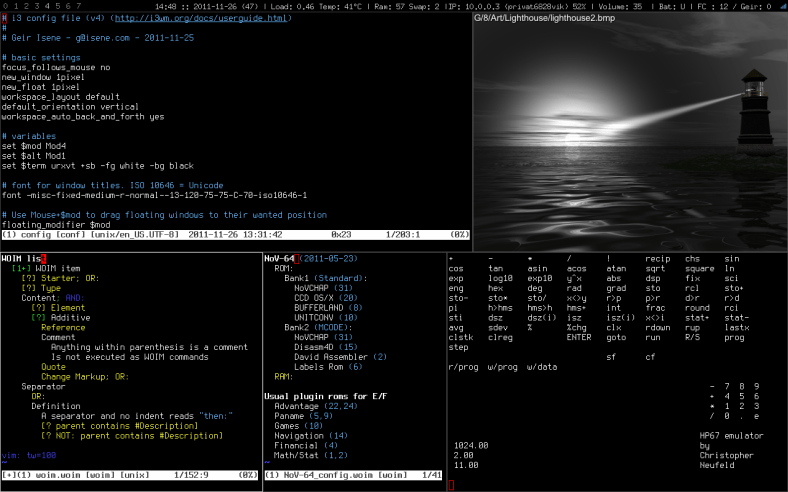
Then I found i3. What a find! It’s the best yet – clean, well documented and behaving just like I could have dreamed of. It’s fucking amazing.

If you are interested in a Window Manager you can customize to your hearts content with a clean config file and excellent docs, you should take a look at i3. As they say on the website: “Do What I Mean. Good Docs. Clean Code. Sounds good? Then you will love i3.” And you will. For reference; here’s my dotiles; .xsession, .i3/config, conkyrc. Enjoy 🙂