Hard Core to Soft Core

Just got around to write down more of our ideas (Brendan and myself) in a document titled “Hard Core to Soft Core”.

Here’s the abstract:

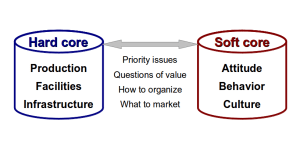
How do the soft assets of an organization relate to the hard assets? How does an organization change its culture? How does the structure of an organization relate to its people, products and processes?

These are but a few of the questions this article examines. It highlights the relationships between the various elements of an organization — from the hard core physical assets to the soft, intangible human elements.

Here’s the document: http://www.scribd.com/doc/94065549/Hard-Core-to-Soft-Core

Talk on Scientology – summary

A few days ago I posted about the talk I was about to do on Scientology in Trondheim.

The talk was yesterday, and here’s a short summary.

I didn’t know much about the context, and I decided to not prepare my talk other than being generally inspired by the comments to the previous blog post.

I was pleasantly surprised. With the student society, their 100 year old building, the main event hall build like a circus, the atmosphere, the people. They wanted a different take on Scientology – a more open and un-slanted approach than what is usually presented in the media. The girl that first suggested that I should come to the event, Astrid Trondal, is an interesting person -very direct and no fuss. The rest of the directors of the student society – very pleasant, open and focused on creating quality events.

And then I got to meet professor Asbjørn Dyrendal. Asbjørn is very knowledgeable in areas of new religious movements and conspiracy cultures. He gave me interesting relations between Scientology and other movements with various similarities.

Asbjørn Dyrendal

As the event was in the main hall of the student’s society building, the formality was strict. Asbjørn started with a 20 minute introduction to Scientology. It was pretty spot-on and laid the foundation for my talk, also 20 minutes. I dispensed with some of the formalities by requesting that instead of talking from behind the formal stand, I could use the floor and wave my hands an walk/jump around as I wish. There was probably more than 150 students attending, and from the response it seems they enjoyed the talk 🙂

The main hall before the attendants filled the seats.

I basically told my story into, in and out of Scientology. My main message was that even though I had seen much craziness over the years, my positive gains from Scientology out-weighed it by a large factor… that I had spent lots of money on Scientology, and that I would spend it all again, or even the double amount to get the same gains.

After a cool artist break (improvisation theater), it was time for the audience to ask questions to Asbjørn and myself.

Very intelligent questions, different angles, covering many areas of Scientology – from my shift in viewpoint over the years, what is good and what is bad about Scientology and the Church, Scientology and bloated PR, the apparent expansion but factual contraction, how Scientology is viewed in different countries and the various levels of Scientology. When one of the attendees asked if the South Park episode on Xenu reflected what parishioners get to learn on OT 3, I answered that yes, it’s pretty accurate. I didn’t hold back or soften anything or beat around the bush. It was straight talk on Scientology. I returned their intellectual honesty with the same.

I was asked if people would get the same gains from other practices. I answered that I don’t know as I haven’t done other practices covering the same types of gains. I also made a point that I cannot vouch for any scientific accuracy of Scientology. I can only vouch for what Scientology has done for me. I didn’t defend Scientology, nor did I attack it. But I did tell them that they should avoid the church. If they wanted to look into Scientology themselves, they should look outside the Church of Scientology.

It was fun, good laughs, inspiring. A great audience. We ended the evening off in the nice student bar with interesting discussions about Scientology, new religious movements, copyrights, patents and free information.

Update: Pic from the event:

ITIL – pragmatic and simple

As you may (or may not) know, I have been working professionally for many years with the IT organizational framework called ITIL (IT Infrastructure Library).

As mentioned before, my main focuses when helping my clients is:

  1. 100% responsibility
  2. Simplicity
  3. Immediate relevance

As ITIL can be seen as almost the opposite of the above, Brendan Martin and myself have been working hard to reduce ITIL to something simple, that is immediately relevant for an IT department or vendor, and that embodies the concept of 100% responsibility. Through numerous successful projects, we have now summarized our approach in a simple and straightforward document.

From the abstract:

“The IT Infrastructure Library (ITIL) is a best practice framework for service management . ITIL is a trademark owned by the Cabinet Office (part of HM Government). The framework was originally intended to serve the delivery of Information Technology within a company, but can also be used outside of IT and for delivery of services between companies. It could be argued that ITIL focuses on the implementation of processes to facilitate service management.

This article provides a pragmatic view of ITIL – a simpler and more straightforward implementation of some of the core ITIL processes.”

Get the article at Scribd.com or get the PDF directly from isene.com.

I have sent out the following message to several ITIL-related LinkedIn groups totaling more than 80000 members:

“Those who have been wrestling with the ITIL books may appreciate the simplicity presented in this article: http://www.scribd.com/doc/91495325/ITIL

I expect objections ranging from “It isn’t this simple” and “Organizations are too complex for this approach” to “You don’t implement ITIL, you implement Service Management” and possibly “You can’t give this away for free“. The ITIL professional communities tend to be rather elitist, self-protective of their revenue stream, closed-data-minded and complex.

But since I believe in simplicity and that information should be free, I decide to share this freely.

Talk on Scientology

On Saturday 28th (in two days) I will hold a talk at a seminar arranged by one of the larger student societies in Norway.

I will take the opportunity to ask for your opinions about what I should cover – subjects and angles. And as usual, I will not let the opportunity pass to ask the smartest people I know – the readers of this blog. Obviously, I do as I feel like, but you may have some ideas that could make for inspiration.

Short notice… but: shoot.

A decent e-mail setup

After my company decided to move its mail services to GMail, I was faced with a more complex e-mail setup. I now have four different email accounts that I need to log into and read mail from. There are several e-mail aliases on two of the accounts. So, with two different GMail accounts (one with my first name dot my last name at GMail.com and the other with my full e-mail address from my company as login [yes, the full login address is geir.isene@freecode.no@imap.gmail.com]).

I decided to plunge into it and create a full e-mail architecture that would serve me the best. This is a technical article aimed at helping those with similar challenges that I encountered in the last few days. With this I hope others will not have to spend hours upon hours wading through troubleshootings in the quest for a decent e-mail setup.

Design goals: To have all e-mail on my laptop and handle it locally for speed and convenience while at the same time keep a copy of important mail on the servers as backup and for handling when I am not at my laptop. Additionally I want the fetched e-mail stored in various folders in my local e-mail system. I want all this easily configurable so that, for example, certain mail is fetched and marked as read, but not deleted and stored in a specific folder in local mail.

With e-mail handled locally, I get faster response in e-mail handling, faster search, faster scripting, and more time for my children.

Here’s my basic setup:

First I go all the e-mail from my company mail server (which I used IMAP to read and which is now moved to GMail) with OfflineIMAP. This resulted in a some hundred thousand e-mail transfered to my local folder (~/Maildir) with all my folder structure preserved.

Here’s the first challenge; Since my company uses Courier as the IMAP server, all IMAP folders are stored in a flat directory structure with a “dot” as a directory delimiter. This means that the folder “INBOX/Geir/Personal/” is stored not as a real tree structure in the file system, but rather as the directory named “INBOX.Geir.Personal/”. With more than hundred directories, this becomes a very un-navigatable list if it wasn’t for Courier’s ability to show this as a usual hierarchy.

First I tried to point Mutt directly to my Maildir directory to handle e-mails directly from that folder. But then I was faced with the list of flat directories that makes it unmanageable. It also makes it impossible for Mutt to “subscribe” to folders as in a normal IMAP server setup.

So I decided to install an IMAP server to handle the directory structure so that the hierarchy would show up in Mutt. This would also add the benefits of easy folder creation and easier scripting with Ruby’s Net/IMAP class.

I first tried the Dovecot IMAP server, but couldntt get it to show my folders in a hierarchy structure, so I went on to install the Courier IMAP server on my laptop.

But alas, Courier would not show my directories at all. Lots of debugging and I figured out that the root directory (~/Maildir) was itself treated as the “INBOX” and all subdirectories must start with a period. Therefore I had to rename all the folders produced by OfflineIMAP – for example, “INBOX.Geir.Personal/” had to be renamed to “.Geir.Personal/” and voilá – all folders magically appeared! (Use “rename ‘s/INBOX//’ *”).

Then it was the matter of getting mail fetched from four different accounts at three different servers. I tired Fetchmail and Getmail and looked at Retchmail. But none of these provided an easy path to my design goals.

So I decided to go ahead and make my own solution. With my old imap_tools as the foundation, I created a script that not only satisfied my design goals but also provides great flexibility and an easy way to enhance it in the future (being a Ruby script makes it easy for me). The resulting script is fairly easy to use even if you don’t know Ruby. Just substitute what you need in the script and save it in your “bin” folder (set permissions with “chmod 755 mail_fetch.rb”).

Due to WordPress’ limitation in uploading files, I give you the whole script here (disregard the screwy tabs and the proportional font – again WP-limitations to html):

——————————

#!/usr/bin/ruby 
# Copyright 2012, Geir Isene. Released under the GPL v. 3
# Version 0.2 (2012-04-24)


##################
#   Initialize   #
##################

require "ftools"
require 'net/imap'

# In .mail.conf, set the appropriate variables like this:
#
#  I_server1  = ""
#  I_user1    = ""
#  I_pass1    = ""
#
# Iserver0 would be "localhost" for mail delivery to local IMAP server
# Use as many servers you need with I_serverX, I_userX and I_passX
load    '~/.mail.conf'

$count = 0


###########################################
#   Define main Fetch & Filter function   #
###########################################

def matching (match, match_in, to_box, del)
    res = []
    message = ""
    to_box = "INBOX." + to_box
    if match_in =~ /s/ then res = res + $imap_from.search(["UNSEEN", "SUBJECT", match]) end
    if match_in =~ /b/ then res = res + $imap_from.search(["UNSEEN", "BODY", match]) end
    if match_in =~ /f/ then res = res + $imap_from.search(["UNSEEN", "FROM", match]) end
    if match_in =~ /t/ then res = res + $imap_from.search(["UNSEEN", "TO", match]) end
    if match_in =~ /c/ then res = res + $imap_from.search(["UNSEEN", "CC", match]) end
    if match_in =~ /h/ then res = res + $imap_from.search(["UNSEEN", "HEADER", match]) end
    if match_in =~ /a/ then res = res + $imap_from.search(["UNSEEN", "TEXT", match]) end
    res.uniq!
    res.each do |message_id|
      message = $imap_from.fetch(message_id,'RFC822')[0].attr['RFC822']
      $imap_to.append(to_box, message)
      if del == 1
	  $imap_from.store(message_id, "+FLAGS", [:Deleted])
      else 
	  $imap_from.store(message_id, "+FLAGS", [:Seen])
      end
      $count = $count + 1
    end
end


#######################################
#   Log into the target IMAP server   #
#######################################

$imap_to = Net::IMAP.new(I_server0, port="143")
$imap_to.login(I_user0, I_pass0)
$imap_to.select("INBOX")

###############################################################
#   Log into each "from"-server. Start Fetching & Filtering   #
###############################################################
#
# The syntax for matching is: 
# matching("string-to match", "match-against", "send-to-mailbox", "delete mail?)
# Set "delete mail?" to 1 if you want mail deleted from the source server.
#
# The following options are available to match against:
# "s" for SUBJECT, "b" for BODY, "t" for TO, "f" for FROM, "c" for CC
# to match any part of the mail (header or body): "a" for ALL

# From I_server1 (private GMail)
$imap_from = Net::IMAP.new(I_server1, port="993", usessl="true")
$imap_from.login(I_user1, I_pass1)
$imap_from.select("INBOX")

matching( "",				"s",	"Geir",		    0 )	# Catch rest

# Expunge mails that are set to be deleted and then disconnect
$imap_from.expunge
$imap_from.disconnect

# From I_server2 (FreeCode GMail)
$imap_from = Net::IMAP.new(I_server2, port="993", usessl="true")
$imap_from.login(I_user2, I_pass2)
$imap_from.select("INBOX")

matching( "efn-listen",			"tc",   "Lists.EFN",	    1 )
matching( "efn-agenda",			"tc",   "Lists.EFN-agenda", 1 )
matching( "styre@mailman.efn.no",	"tc",   "Lists.EFN-styret", 1 )

matching( "",				"s",    "FreeCode",	    0 )	# Catch rest

# Expunge mails that are set to be deleted and then disconnect
$imap_from.expunge
$imap_from.disconnect

# From I_server3 (FreeCode OLD)
$imap_from = Net::IMAP.new(I_server3, port="993", usessl="true")
$imap_from.login(I_user3, I_pass3)
$imap_from.select("INBOX")

matching( "ivy-subscribers",		"tc",	"Lists.IVY",	    1 )
matching( "FreezoneOrg@yahoogroups.com","tc",	"Lists.FZa",	    1 )
matching( "ifachat@yahoogroups.com",	"tc",	"Lists.FZa",	    1 )
matching( "koha",			"tc",   "Lists.Koha",	    1 )
matching( "nuug.no",			"tc",   "Lists.NUUG",	    1 )
matching( "linuxiskolen@skolelinux.no",	"tc",   "Lists.SLX",	    1 )
matching( "spirituellkultur",		"tc",	"Lists.AltMus",	    1 )
matching( "hhc@lists.brouhaha.com",	"tc",	"Lists.HHC",	    1 )

matching( "",				"s",	"Geir",		    0 )	# Catch rest

# Expunge mails that are set to be deleted and then disconnect
$imap_from.expunge
$imap_from.disconnect

# From I_server4 (FreeCode Int)
$imap_from = Net::IMAP.new(I_server4, port="993", usessl="true")
$imap_from.login(I_user4, I_pass4)
$imap_from.select("INBOX")

matching( "",				"s",	"FreeCode",	    0 )	# Catch rest

# Expunge mails that are set to be deleted and then disconnect
$imap_from.expunge
$imap_from.disconnect

##############################################################
#   Check for new mails in folders and write result to file  #
##############################################################

mailboxes = [
    [ "FC  : ",	"FreeCode"	    ],
    [ "Geir: ",	"Geir"		    ]
]

open('/home/noosisegei/.mail', 'w') do |f|
    mailboxes.each do |a|
	f.write( a[0] + $imap_to.status("INBOX." + a[1], "UNSEEN")["UNSEEN"].to_s + "\n" )
    end
end

# Copy file to another file to ensure no blinking in Conky
# Read the file from Conky to display new email in each folder
File.copy('/home/noosisegei/.mail','/home/noosisegei/.mail2')

#######################################################################
#   Disconnect from target server & Display number of mails filtered  #
#######################################################################

$imap_to.disconnect

puts "#{$count} mails filtered"


——————————

To make the script run every minute, add it as a cron job. Use “crontab -e” to add:


* * * * * /home//bin/mail_fetch.rb >/dev/null 2>&1

Just substitute “” with your own username. It outputs the number of new mails in certain folders by writing it to a file named “~/.mail2 so that you can use this to display new mails in Conky (see my conkyrc for how this is done).

I hope this will shave a few hours off someone’s schedule.

Update: Dovecot is not compatible with the above script as it fails to deliver the $imap.status message (“UNSEEN”) from the mail repository. So, Courier is the IMAP server to use with this script.

Self-therapy

I am an unstructured, rather chaotic person. Ideas and thoughts all over the place. I do manage to collect the ideas and bring many to fruition. But the process is often marked by improvisation and experiments. I try, I fail, I succeed, I fall and I get up again. More structured people may find this hard to follow, annoying or even hopeless.

Ever since I was a child I have looked at ways to structure my processes. HyperList is a culmination of this efforts, but there have been many more or less structured efforts at collecting my thoughts and ideas into neatness. It is a kind of self-therapy.

Maybe that is how many if not the majority of methodologies are created. It has been argued that L. Ron Hubbard created Scientology to handle his own issues. Just like many may opt for studying Psychology to straighten out their own mind. It may reveal a lot about the person’s own problems by looking at the methodology he is selling to others.

Maybe Christ was insecure about his own faith in God? Maybe Buddha struggled with chock from his first encounter with pain and suffering? Maybe Freud had deep sexual issues? Etc.

And precisely because of this one should be well aware of one’s own issues, what one wants to handle, if anything, before one adopts a specific path. Maybe a certain path is not the right one for you, or not just now. It may be the right one for it’s originator. Maybe even for millions of others. But there may be another, better path for you. And if not, then you could just create your own.

And when you sell the right path for you to other people, be aware that it may not be what they need or want.

I will continue to sell the most eminent descriptive system, HyperList, but I do realize it is not for everyone. Nor is my take on the connection of Will and Reality, or my upcoming work on Anchorbreaking.

I believe that no one possess the key to unlock every door. You have in your hand the key to unlock yours.

As for my own; I can warmly recommend the book “A perfect mess“.

Creating value on this blog

My reasons for blogging are manifold;

  1. To get stuff out of my head in order to make room for more stuff in there,
  2. to inspire others and create some value for my readers,
  3. to remind myself of certain aspects of life (it works best when I write reminders down or say them out loud),
  4. or to inspire others to help me (re)form my viewpoints.

When I post about geeky stuff like HP calculators, there is usually silence or a handful of comments. When I post about the meaning of life, of beliefs or some such, the comments can stack up beyond a thousand.

I try to stay focused on creating some sort of value also during discussions. And sometimes I fail. When I engage myself in arguments to prove another wrong, then I fail. I can come across as hard-nosed and snarky. And I apologize for that. I don’t want any of that on my blog. What I want is friendly discussions with good manners, good netiquette.

I want to see this blog create value for every reader, every contributor. There are some notable examples of people who contribute great value to this blog, like Maria, Marildi, Dennis, Chris and several other high contributors.

You may consider this blog post in the light of points 1 and 3 above.

Assumption

Religions, therapeutic practices or ideologies often base their methodologies on an assumption about what you want to achieve.

In Judaism, Christianity and Islam the goal would be to serve God and to have a union with God and to reach Paradise. Nirvana can be seen as a goal of Buddhism, whereas Hinduism promotes four goals. Various branches of psychology serve to work toward less irrationality, less mental suffering or even more obedience. Yoga attempts to let the person become aware of her deepest nature. In Scientology, your goal is to reach total freedom. Other ideology goals can be harmony, enlightenment, awareness, knowledge (as with science) or peace or love.

Promoters of a methodology often assumes that you want the goal they want. To a Scientologist disseminating Scientology, it is obvious that you want spiritual freedom, or at the very least that you are determined to increase your potential for survival. To some promoters of harmony, it is obvious that the path lies with “looking” to attain knowledge, to others the path is obviously “tolerance” or to yet another it could be “you already know, so just know”.

The point I am getting at is that such assumptions can be dangerous. An assumption about what the person wants can lead him astray from himself. An assumption about what is “obviously” the best path to a goal that he truly wants can lead him into missed opportunities or even into the woods. Assumptions are the hallmark of failures.

What is often missing, is the assessment of what the person himself really, truly wants. And no matter how convinced the therapist, friend or random-person-wanting-to-help is about the “obvious” goal, it may be completely wrong. Or if the person’s goal aligns with a certain methodology’s goal, that path may still be the wrong path for that person.

Perhaps this could form the basis for an interesting discussion.