Tools

A tool is any aid to accomplish a task. From a hammer, drill, robot or car to a process, method, equation or your own mind. A plan, a preconceived idea or an expectation are also tools. As long as a toll remains under your control, you’re fine. But when the tools start running you, responsibility and control suffers. Let’s kick this off with the dictionary definition of “tool”:

tools

TOOL (Mirram Webster)

1 a : a handheld device that aids in accomplishing a task
b (1) : the cutting or shaping part in a machine or machine tool (2) : a machine for shaping metal : machine tool

2 a : something (as an instrument or apparatus) used in performing an operation or necessary in the practice of a vocation or profession [a scholar's books are his tools]
b : an element of a computer program (as a graphics application) that activates and controls a particular function [a drawing tool]
c : a means to an end [a book's cover can be a marketing tool]
d often vulgar : penis

3 : one that is used or manipulated by another

4 plural : natural ability [has all the tools to be a great pitcher]

Origin of TOOL: Middle English, from Old English "tōl"; akin to Old English "tawian" to prepare for use — more at "taw". First Known Use: before 12th century

Let’s focus on definitions 2a and 2c here.

I could go on and on explaining the usefulness or necessity of tools, the joy of my tools (HyperList, my HP calculators, my PC, my mind and my penis), or the troubles that ensue when your tools starts taking over. I could explain how troubles in life most often come about when your mind starts running the show, rather than you remaining in control (the essence of irrational behavior). I could point to the article “Processes, Automation and Human Potential“, and show that automation must remain under someone’s responsibility, lest it will bereft the user of will. Etc.

But for the sake of succinctness, I will leave you with a scale of “free will“:

  1. No Tools
  2. No tools needed
  3. Tools used freely
  4. Tools used compulsively
  5. Tools needed
  6. Automation
  7. Only tools

When you are in prison, you are at level 5 or 6 – the effect of tools (the prison system). When you are scared shitless of a spider on the floor, you are likewise at level 5 or 6 as your mind has taken over the control. When you use a calculator to figure out an answer, you are on level 2, 3, 4 or 5 depending on whether you could have gotten the answer without the calculator. When you use a slide show in a presentation… levels 2-5, unless you have no choice at all – as when your boss has ordered you to run those exact slides (then you would perhaps serve at level 6). When a process or method or ideology becomes more important than the result it aims to achieve, you operate at a level below 3.

In different areas of life and at different times, we are operating at different levels on this scale. Our need for tools depends on our inherent abilities, our confidence and our love of the tools we use.

Of course, tools are part of any game. To master a game, you must master the tools, and that implies being able to use the tools freely, if at all. When you are struggling in a game, you are struggling with the tools, you are unable to use them freely. And that includes your mind.

Personally, I am on a quest to nudge myself towards the top of the scale on most any area of life (except for my HP calculators). It seems to me that freedom is gained through regaining the ability to freely use the tools in a game, and by the subsequent shedding of the tools involved.

Choices, choices…

Looking to buy a new car, a house, an HP calculator or a new telescope. Looking for the perfect job? The perfect employee or the perfect girl? Or deciding between a set of possible choices and having a hard time making up your mind?

There is a simple tool that I have used many times when faced with difficult choices (including that of finding the perfect girl). It requires you to simply list all the important items in a requirement specification and giving each item an importance or “weight” (any scale will do). And then as you are faced with each case to evaluate, give that case a score on each item in the list of requirements. A simple example:

If you are to recruiting a new employee, the specification would consist of items such as “relevant knowledge”, “relevant job experience”, “proven production record”, “communication skills” or “empathy”. You would give each item a certain weight where “relevant knowledge” could be given a weight of “4” while “empathy” for this specific job could be given “2” in weight.

When a requirement specification is populated with a list of weighted items, it’s time to pitch a set of cases against the specification. You figure out the scale you want to use and put a score on each item of the requirement specification for the case you evaluate. The scale goes from “0” to any number you set as the maximum score. A candidate for a job could score a “3” on “relevant knowledge” and a “5” on empathy on a scale from “0” to “5”. You then multiply the score with the item’s weight to get the “weighted score”. So even though the candidate receives a maximum score on empathy, she only gets a weighted score of “10” on that item compared to “12” on “relevant knowledge”.

Finally, you sum up all the weighted scores, divide by the sum of the item weights, divide by the maximum score and multiply with 100. Then you have a total percentage score of how well that case fits the requirement specification.

A tool? What do you mean with “a tool”?

You want a tool to help you create a requirement specification with a list of weighted items and then to easily manage and evaluate many cases against it?

Sure, I have that. Do you have an HP-41 calculator?

I know, I know. It’s a stupid question. Of course you have the best calculator ever made sitting right there on the table and in daily use no less.

Then I will supply you with this neat evaluation program utilizing a new trick; dynamic menus.

What’s that? Well, head on over to my calculator’s page and check it out. Choosing the perfect girl is at right your fingertips.

What’s with the discussions?

This blog has been active for 1,5 years now. It replaced my old Scientology blog as I wanted to move my open writing into any area that tickled my fancy. Like free will and other existential philosophical subjects, HP calculators and other technical subjects, as well as life and living.

This space is marked by many long and interesting discussion by very smart people with very different viewpoints. When I write somewhat controversial posts, the discussions usually counts several hundred comments, some even more than a thousand. This has become the blog on the Internet that gathers the most replies on specific Scientology-related subjects. Perhaps because it tackles the core philosophy of Scientology and possibly because it retains a fairly objective stance, being neither effusively pro nor toxically against. But rather exploring, evaluating and searching for areas to improve.

However, my interest lies not with Scientology. What occupies me is enlightenment, truth, free will and general improvement. Any tool should remain junior to an intended result. Except for my HP-41… it remains a solution is search of a problem. Being a nerd at heart, I luv my tools – but I still try to keep my eyes focused on the goals. I try to do what generates the best results toward those goals.

Do the discussions on this blog? Are they worth it? What are they worth? Almost a hundred comments per day is a lot. Maybe it’s time to end the discussions while on the top?

Nerdvana

I have officially transcended to Nerdvana.

A few of you may have noticed my rather official insanity; An advanced fascination for old Hewlett Packard calculators – especially the amazing HP-41.

I use my 28 years old calculator every day. I program it and develop new software module images that I release as Open Source. And I am certainly not alone. Thankfully others share my insanity. Some create wonderful software that I use. Others create new hardware. Like Diego Diaz with his amazing plugin modules. And Monte Dalrymple with his new replacement motherboard for the HP-41 – the HP-41CL:

HP-41CL internals

Photo by Geoff Quickfall

With one of my HP-41 calculators now upgraded to a 41CL, my world is markedly more amazing. Yes, it’s an escape, but a wonderful one at that. It is 50 times faster and has hundreds of times more memory… and a direct serial interface. With this I can control The World. I could control my telescope, the lighting in my house or hack into…. Muhaaahaaahaha!

HP-41CL

Photo by Geoff Quickfall

Ok, ok. I realize that this is a bit fringe and where my posts here usually racks up a few hundred comments, this will be lucky to gather 5. But hey, this is my blog and I blog about whatever tickles my fancy. And this upgraded calc tickles. Yep ROTFLMAO.

My Open Source hero

I have been working professionally with Open Source software and Free Software since 2000. I have gotten to know a great many excellent developers, many work in my own company, FreeCode. But today I would like to acknowledge a person who inspires a passion I have, a hobby a cherish.

As Open Source (or even Free Software) has gone mainstream, there are Open Source developers seemingly everywhere. From the large communities like Linux (kernel, core programs, utilities, applications and various distributions), portal software (Drupal, Mediawiki, etc.) and games (Battle for Wesnoth being my favorite) to more esoteric projects.

As a reader of my blog, you may have picked up my fascination with old HP calculators and the programming of the HP-41. Especially the really low level programming in assembler, called MCODE (Machine CODE) for the HP-41. It is in this arena that I would like to acknowledge my Open Source hero.

Ángel Martin excels at MCODE. He excels at documenting MCODE. He is a learning machine and a teaching machine. He’s got more contributions to the HP-41 MCODE than you could shake a stick at and he shares his contributions freely. And he’s a social and very likable guy – not like the many Gollums who succeeds before a machine but not amongst people.

Yes, Ángel Martin is my Open Source hero.

Cryptography on the HP-41

HP-41

Nourishing my hobby, I have been playing with cryptography on my favorite tool.

Now you can have perfect security for a file of up to 300 characters on the little calculator-computer.

If you happen to be interested, you will find the program at the usual place (isene.com).

I really enjoy programming the HP-41 🙂

And now that I have the newly created motherboard replacement (called the HP-41CL) from Monte Dalrymple (Systemyde), I will get to upgrade my HP-41 to massive memory and 50x speed. It’s X-Mas in August.

The NOV CHAP module

Finally, after much work and testing, we are proud to release the NOV CHAP rom – the software companion to the HEPAX and NoV modules.

It includes both MCODE and FOCAL functions in four categories;

* NOV functions
* Advanced HEPAX functions
* Advanced Extended Memory (XM) functions
* Special utilities.

Try it out – and please report any bugs or suggested improvements by adding your comment in this thread or send an e-mail to Geir Isene.

Get the ROM, Source and User Manual at the NOV CHAP website

Sincerely yours,

Team IceAngel

(Geir Isene & Ángel Martin 🙂 )

PS: I do realize that this may fall outside of the fields of interest to many of the readers of this blog. But seriously, you need to get yourself an HP-41, and a NoV module with the new NOV CHAP.

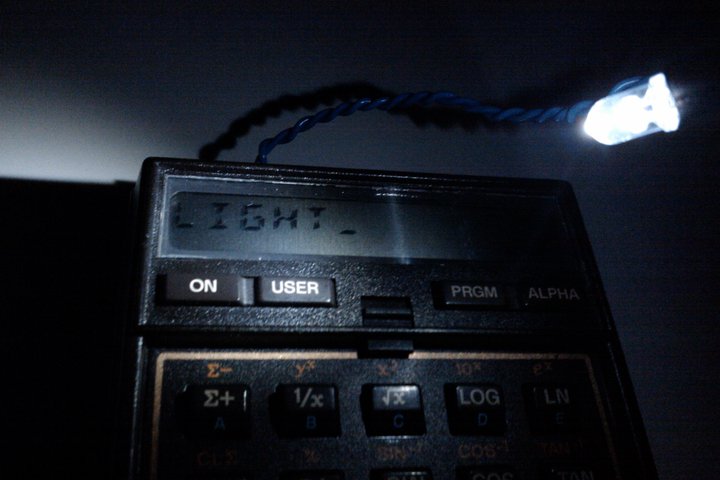
HP-41 in the dark

Yes, I have the same problem as you. When you feel the urge to program your precious Hewlett Packard HP-41 calculator in the middle of the night, you would have to turn on some light source. A lamp would wake up your wife or the kid that decided to occupy half of your bed. You need a small light source.

And when you are out with your telescope inventing new ways to justify the use of your 30 year old calculator, you need some light source that doesn’t kill your night vision.

A while back I made a plug-in module for my HP-41CX that had a LED attached to two wires coming out from the module. As I didn’t know which of the internal module pins to solder the wires to, I ended up with a Porta-Lite module where the LED would always be on regardless if the calculator was turned on or not.

Yesterday I decided to open up the module and do it right this time.

Yes, it’s a simple hack. And for those hardware gurus over at the HP Forum, this would seem pretty trivial. But for me, a predominant software guy, it’s a small hill. A small hack, but a useful one.

Ok, “pics or it didn’t happen” – so here they are:

For the calculator nuts: Free42

Obviously you have a number of HP calculators on your desk and in the showroom glass cupboard. And obviously you are addicted to the RPN method of calculating. But now and then you are away from your precious toys and stuck with your phone or PC with a much less than optimal “calculator” program.

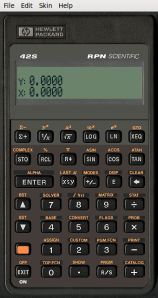
Here’s a tip: Get yourself a copy of Free42 by Thomas Okken.

The Free42

It’s the coolest desktop/mobiletop calculator in town.

Just my 2 cents.

New design on isene.com

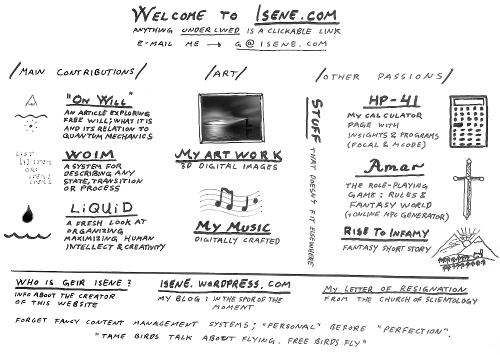
I finally got around to redesigning my website.

It’s been like this for a few years now:

Now it looks like this:

I know, it’s a crazy idea… no structure, not at all professional, only a drawing… OMG WTF? BBQ!

But it’s all there. Even a new revolutionary take on organization (I’ll make that a separate blog post later).

Hop on over and check it out.